How DNS Resolution Works
1) What is DNS and why name resolution exists
Domain Name Resolution (DNS) , helps to convert your domains into IP address
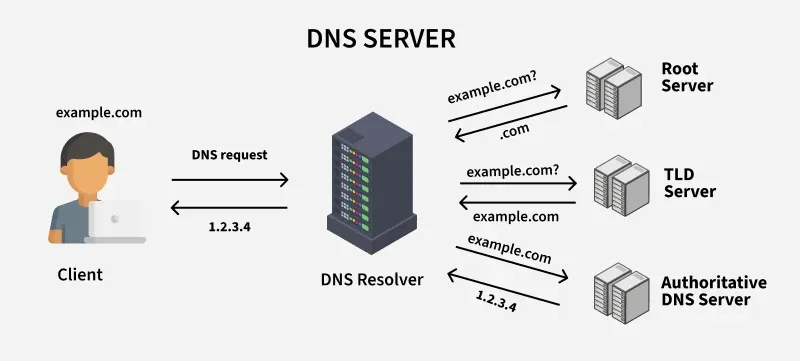
The above diagram helps you to understand , how websites open when you type www.chaicode.com
Step 1 :
User opens chaicode website in his/her favourite browser
Step 2 :
Request goes to DNS resolver which in return provide the IP of respective website (chaicode.com) in our case.
Step 3:
How DNS provides an IP and shows website in browser?
Inside DNS we have multiple things which helps to provide the IP address , like :
Whenever ser open any website it checks cache for loading wesite faster , if not found then goto step 2 , else open the website.
Root Server : Checks for the correct Top Level Domain server , like .com , .in and route to correct TLD server.
Top Level Domain (TLD server): Routes to correct A record(Authorotative Server) which helps to provide the correct ip address of the respective domain.
Authoritative Server: Final place which provides the ip address to the client and clinet can see the website.
dig as a diagnostic tool to inspect DNS resolution
dig = Domain Information Groper , means this tool provides the information related to dns.
It is a command-line tool used to:
Check DNS records (A, AAAA, MX, TXT, NS, CNAME, etc.)
Debug DNS issues
See which DNS server responds
Trace DNS resolution step-by-step
Compare DNS across servers
umangpincha@apple ~ % dig google.com
;; ->>HEADER<<- opcode: QUERY, status: NOERROR, id: 12345
Important Fields:
status:
- NOERROR ✅ success
opcode: QUERY
id: query ID
;; QUESTION SECTION: ;google.com. IN A
Meaning:
- Asking for A record of google.com
;; ANSWER SECTION:
google.com.        104    IN    A    142.251.223.238
Meaning:
Provides google.com ip address , means if you type 142.251.223.238 in browser, it will open google.com :)
Common dig Use Cases
- Check A record IP address
dig google.com A
- Check MX record (Mail Servers)
dig google.com MX
3. Check CNAME (Alias)
dig google.com CNAME
What NS records represent and why they matter ?
NS = Name Server is a server which tells , which DNS server will handle the DNS request of the particular domain.
dig google.com NS

O/P
google.com.        286115    IN    NS    ns1.google.com.
google.com.        286115    IN    NS    ns3.google.com.
google.com.        286115    IN    NS    ns2.google.com.
google.com.        286115    IN    NS    ns4.google.com.
Meaning:
These servers are responsible for all DNS records of google.com
For eg : If Domain = Company and NS are the customer support , if someone asks where is google.com then it will contact NS like ns1.google.com
Importance
TLD server contacts with NS , so that it can tell which nameservers are responsible for handling the DNS request of xyz domain.
If NS don’t exist then its not possible to do the DNS resolution
Why Multiple NS ?
High Availability: if ns1 fails ns2 is available
Load Balancing: Traffic distributed among the multiple servers.
Thank You 🙏🏻

