Getting Started with CURL

Let say you are at your home and you want to eat pizza , you called the restaurant and ordered it , similarly in the world of internet curl does the work of calling 😃.
In simple word = CURL is a tool from which you can talk to internet
1) Why CURL is needed ?
To talk to website
To test API
To check the response of the website/server
To debug, if any issue
2) CURL Basic Flow
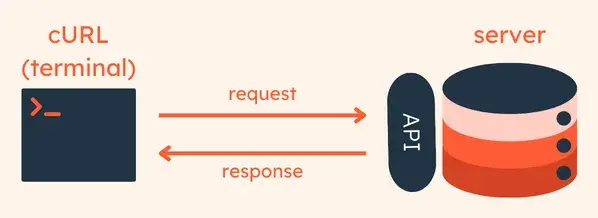
curl chaicode.com
Output can vary:
HTML code of website
API response
Error message
3) Understanding request and response
Request → What you ask
Response → What you get in response of your request
Real World example :
You went to restaurtant and ask for burger its called request , in return you got burger thats response.
Now let’s understand the same via curl
curl https://chaicode.com
In the above example you are requesting to give the data of chaicode.com , that’s called request , and the result which you will get is response.
Request:
Request has 4 items:
REQUEST
--------------------
Method: GET (By Default)
URL: https://example.com
Headers: extra info
Body: (optional)
1) Method (What you want ?)
GET : What you get ?
POST : What you send ?
curl https://chaicode.com
Default method = GET
It means only Read the data.
2) URL
Server Address: https://chaicode.com
3) Headers (Extra info)
Le’t say you said , I want veg burger with extra cheese , that’s what extra information is.
Extra Info === header
curl -H "Accept: application/json" https://chaicode.com
4) Body(Data which you are sending)
Only applicable on POST/PUT
Example:
curl -X POST -d "name=umang" https://chaicode.com
X = To send the data
Normally, curl only sends the data but here by using -X you are sending some data where -d is you data
POST means :
Login
Form submit
Data send
The above command means , server https:/chaicode.com , I am sending you data which is having name=umang , accept it and send me the output
Explaination via diagram
You (curl)
   |
   |  POST request
   |  name=umang
   ↓
Server
   |
   |  Response (JSON)
   ↓
You (Terminal)
Response
Server gives you 3 things
1) Status Code
2) Headers
3) Body
1) Status Code
| Code | Meaning |
| 200 | Success |
| 404 | Not Found |
| 500 | Server Error |
2) Header (Server Info)
Server sends data , something like below
< HTTP/2 200
< date: Sun, 25 Jan 2026 06:46:54 GMT
< content-type: application/json; charset=utf-8
Trick:
\> = REQUEST
< = RESPONSE
CURL example to talk to API:
curl -v https://chaicode.com

O/P:
(REQUEST)
> GET / HTTP/2
> Host: chaicode.com
> User-Agent: curl/8.7.1
> Accept: */*
>
(RESPONSE)
* Request completely sent off
< HTTP/2 200
< date: Sun, 25 Jan 2026 06:50:53 GMT
< content-type: text/html; charset=UTF-8
Diagram
You (curl)
   |
   |  REQUEST (GET chaicode.com)
   ↓
Server
   |
   |  RESPONSE (200 OK + HTML)
   ↓
You (Terminal)
Common mistakes beginners make with Curl
Sending POST request to a normal website (Not an API) , like
curl -X POST -d "name=umang"https://google.comNot understanding GET vs POST
GET = Fetch data (By Default)
POST = Send data
Forgetting headers
curl -X POST -d '{"name":"umang"}'https://api.comis wrong command instead use ,curl -X POST -H "Content-Type: application/json" \-d '{"name":"umang"}'https://api.com
Wrong URL
Not using -v (verbose) to debug
Confusing HTTP and HTTPS , like
curl http://example.comis wrong , instead usecurl https://example.comForgetting quotes in JSON , like
curl -X POST -d {name:umang} https://example.comis worng , instead usecurl -X POST -d '{"name":"umang"}' https://example.com, JSON must be properly quoted.
Thank You for reading 🙏🏻

