DNS Record Types Explained
1) What is DNS ?
Human mind don’t remember the numbers but they are good at remembring the names like in contact list you don’t remember all the numbers but you remember the names of the respective person so you type the name of that respective person and calls him/her , DNS works in same concept , it was introduced so humans should only remember the names like google.com , chaicode.com etc and don’t need to remember the IP’s (Internet Protocol) address associated with every website, so you can remember DNS like a internet phonebook, IP’s (Internet Protocol) address is just like a number 1.2.3.4 given to every website.
2) Why DNS is needed ?
Let assume if DNS don’t exist
Then we have to type numbers in browser like below
http://142.250.76.78
DNS was introduced to solve the above problem and we only have to type www.google.com and it automatically get resolved/connected to the ip associated with google.
3) How DNS works ?
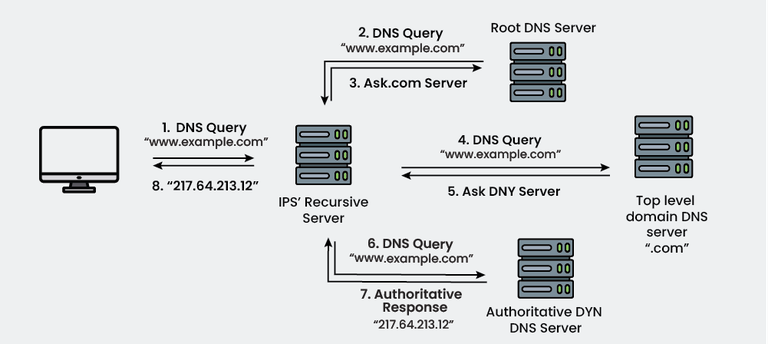
www.google.com
     ↓
Recursive DNS Server
     ↓
Root Server
     ↓
Top Level Domain
     ↓
A Record
     ↓
Authoratative DNS Server
     ↓
IP Address
     ↓
Website Opens
DNS always tells you whome to talk next 🔂
3) Type of records
NS record
An NS (Name Server record) is a server that knows and tells the correct address of a website.
Step 1: User types in browser
google.com
Step 2: DNS asks what’s the ip address of google
Step 3: NS records
google.com → ns1.google.com
           → ns2.google.com
means ns1.google.com , ns2.google.com are the boss of google.com and they will tell the ip address of google.com
Step 4: Authoritative Name Server
At step 3 DNS will get to know who is the boss of google.com then authoritative name server will give the final ip of google.com and website will open in browser.
User
 ↓
DNS Resolver
 ↓
NS Record (Whome to ask)
 ↓
Authoritative Name Server
 ↓
IP Address
So , In short NS record will tell you who is the boss of xyz domain and whome can you ask for correct ip.
A Record
Like every house has its unique address , similarly every domain has its own ip address , so A record is the ip address of the website.
google.com A 142.250.192.206
Means:
Website name: google.com
Home number: 142.250.192.206
AAAA Record
Remember
A record = Address of google.com (142.250.192.206)
Problem in A record is that website on internet keeps on increasing and (IPv4) address were limited so to solve this issue (IPv6) new ip range came (2001:4860:4860::8888).
AAAA record tells the website IPv6 address
Eg:
google.com AAAA 2404:6800:4002:804::200e
In short , AAAA record is just the new address of any website and you can find that via dig command also dig AAAA google.com
CNAME Record (Canonical Name)
Like we have nicknames at our home , similarly every website has its nickname which is known as CNAME.
Example:
www.example.com CNAME example.com
Means:
www.example.com is not the oroginal name
That’s the nickname of example.com
www.example.com (Browser)
      ↓
Check of CNAME (example.com)
      ↓
Check A/AAAA records
      ↓
 Website Opens
In short words, A CNAME record maps one domain name to another domain name.
MX Record (Mail Exchange)
MX Record specifies the mail server responsible for receiving emails for a domain.
Example:
dig MX chaicode.com

chaicode.com.        337    IN    MX    1 aspmx.l.google.com.
chaicode.com.        337    IN    MX    10 alt3.aspmx.l.google.com.
chaicode.com.        337    IN    MX    10 alt4.aspmx.l.google.com.
chaicode.com.        337    IN    MX    5 alt1.aspmx.l.google.com.
chaicode.com.        337    IN    MX    5 alt2.aspmx.l.google.com.
| Priority | Post Office | Kaam |
| 1 | aspmx.l.google.com | Main office (pehle yahin jao) |
| 5 | alt1, alt2 | Backup 1 |
| 10 | alt3, alt4 | Backup 2 |
Flow
Someone sends email to hello@chaicode.com
              ↓
Internet asks where to send this email (MX record)
              ↓
On priority it sends the email like 1 then 5 and then 10 , see above for priority
              ↓
Email reaches safely
If MX record don’t exist?
Email will bounce and wont reach
“Delivery failed”
Business will get impact
MX Records define the mail servers responsible for receiving emails for a domain, along with their priority to ensure reliable email delivery.
4) One complete DNS setup for a chaicode.com website
User
 ↓
DNS Resolver
 ↓
NS Record
 (Whome to ask)
 ↓
CNAME ( tells nickname )
 ↓
A / AAAA Record
 (website address)
 ↓
Website Opens 🌐


Email Flow:
User
 ↓
DNS Resolver
 ↓
MX Record
 ↓
Mail Server
DNS works like a guide system.
NS records tell where to ask, CNAME handles aliases, A and AAAA give the website’s address, and MX records route emails, all DNS records work together to make websites and emails function correctly.
Thank You 🙏🏻

